Traditional bookkeeping is slow and manual. AI-assisted bookkeeping; you review every AI guess. Then you download files you can import into QuickBooks Online, Xero or share with your accountant.
You confirm what is flagged
Price shown before you pay
Canada & United States
Bukso AI: our own private AI bookkeeping engine, built on open-source models. Your data never goes to an outside AI company.
Coming soon: Auto-fetch bank feeds — connect your bank, Bukso AI pulls your statements automatically. · One-click sync to QuickBooks Online, Xero or Sage — coming soon (manual download stays available).
Profit & loss March
Revenue$48,623.40
Cost of goods$13,874.25
Operating expenses$24,005.61
Net income$10,743.54
SAMPLE
Spending by category
2 items to confirm
Online marketplace$186.40Equipment repairs
Cash withdrawal$300.00Owner draw
86 matched automatically
$2.50/page as you go — no subscription needed.
Accountants & Multi-Client Firms
Run every client's books faster.
From$7/client/month
Per active client. Storage bundled. Starter $10 · Practice $9 · Growth $8 · Scale $8 · Enterprise $7 (8 pages/client; 7 on Enterprise). Overage $1/page.
Billed per active client for all your clients' books
Coming soon: Auto-fetch bank feeds — connect your bank, Bukso AI pulls your statements automatically. Not live today — you still upload statements yourself.
We’re gauging interest. Tell us if you want a heads-up when it opens. No outside form — this goes to our waitlist email.
Snap a statement or receipt, confirm what's flagged and see your books from your phone.
Coming soon on theApp Store
COMING SOON ONGoogle Play
Built by a bookkeeper
Our founder spent six years (2005–2011) as a full-time bookkeeper at an Alberta accounting firm. With a technical background and the right AI, he built Bukso to take bookkeeping to the next level — the bookkeeper just reviews the AI’s work, and the accountant gets straight to filing taxes.
Serving Canada (outside Quebec and Saskatchewan for now) and the United States. You confirm anything flagged Export files for QuickBooks Online Email & chat first, no required calls Your price before you pay Securely processed
What is Ai Book Sort?
Ai Book Sort is AI bookkeeping software for small businesses in Canada and the United States, made by a Canadian company. You upload bank and credit card statements and receipts as PDFs, phone photos (JPG, PNG, WebP, HEIC), Excel (.xlsx) or CSV files; the AI reads each transaction and suggests a category; you confirm anything it flags; then you download files for QuickBooks, Xero or your accountant.
How it works
Upload. Price. Pay. Sorted. Reviewed. Reports.
A lightweight walkthrough of the Bukso flow — no heavy live demo. Prefer video? Watch in about a minute.
Drop statements or photos. You see the count before anything is read.
2. Price
We count pages and transactions and show the exact total. No charge yet.
3. Pay
Card through Stripe. Price shown first. Demo takes no payment.
4. Sorted
Bukso AI reads every line and suggests a category.
5. Reviewed
Confirm what it flagged. Nothing is final until you approve.
6. Reports
Download P&L, balance sheet, general ledger and import files.
Proof
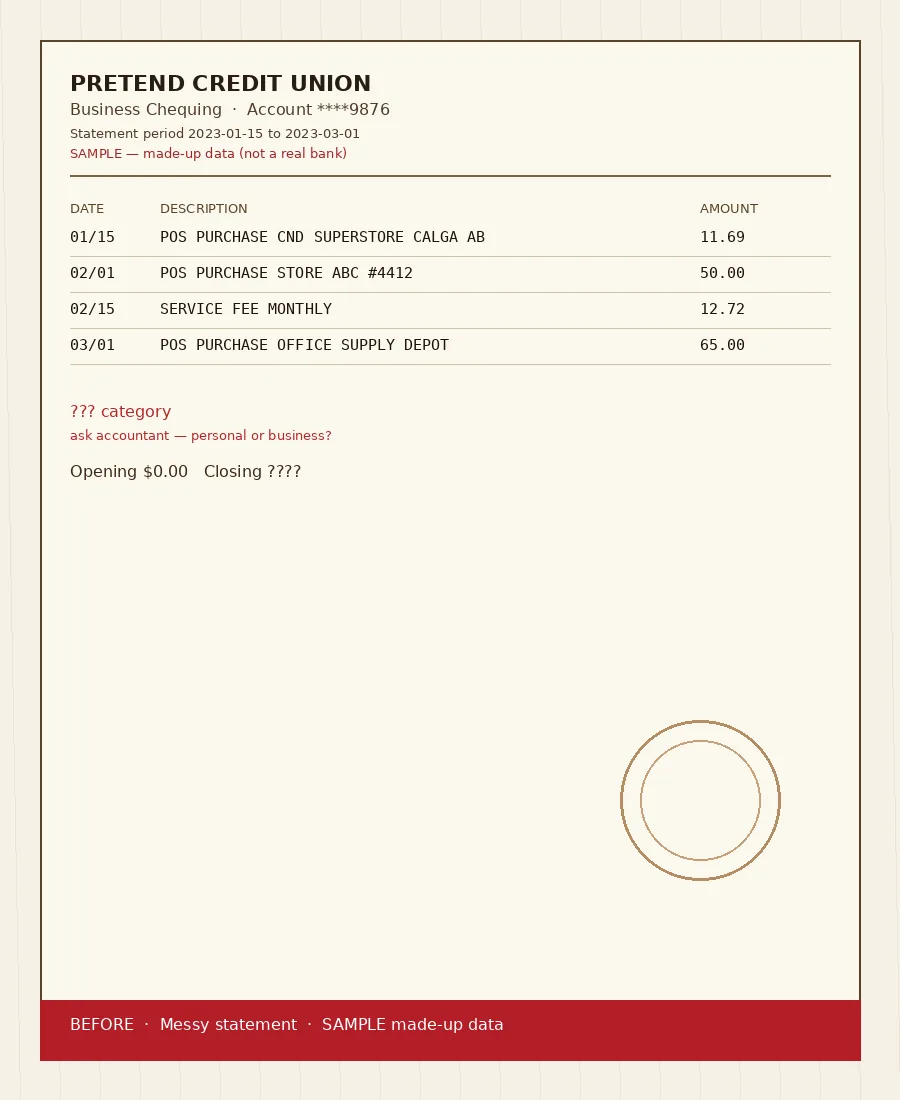
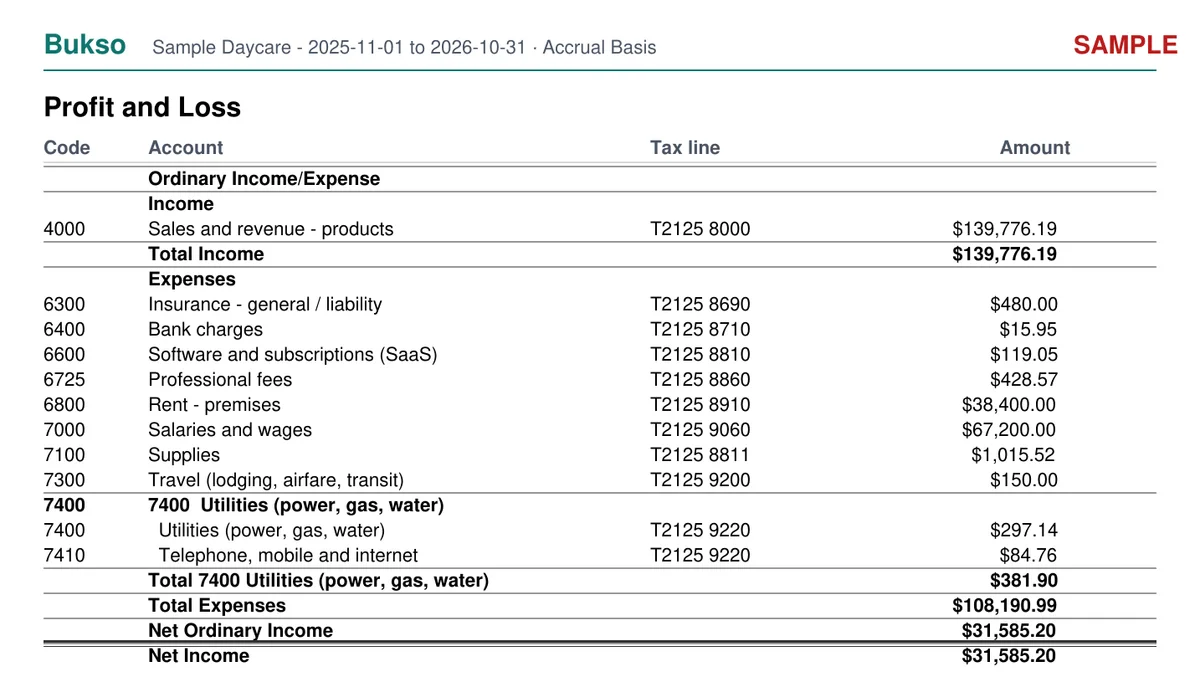
Messy statement in. Sorted lines you review.
Real Bukso AI accountant-package pages from made-up fixtures (never customer data). Account ****9876. Watermarked SAMPLE. Canada and United States examples below.
BEFORE
Messy statement Made-up chequing lines. Not sorted yet.
→Bukso AI
AFTER · SAMPLE
Clean Profit & Loss CA sample from Bukso AI. DRAFT / SAMPLE — made-up data, not for filing. Full CA/US reports below.
Canada · CAD · GST/HST
Sample Daycare · Pretend Credit Union ****9876 · Nov 2025 – Oct 2026 · CAD
Profit & Loss · CAD · GST/HST · Tap to enlarge
United States · USD · sales tax n/a
Sample Daycare · Fictional Community Bank ****9876 · Nov 2025 – Oct 2026 · USD · sales tax n/a
Profit & Loss · USD · sales tax n/a · Tap to enlarge
Sample — made-up data. Generated locally through the portal’s real accountant-package code from made-up fixtures (account ****9876). Auto-fetch bank feeds and one-click sync remain coming soon — today you upload and download.
The problem
Months of statements. One tax deadline.
Most small businesses don't fall behind on their books because they don't care. They fall behind because typing bank lines into software takes hours nobody has. Ai Book Sort does the typing. You keep the judgment calls.
Canada and the United States
Built for both countries from day one
Serving Canada and the United States. Same software, the right tax lines for where your business is. Bookkeeping only: your accountant or tax preparer files.
Canada
Every category has a suggested T2125 line (self-employed) and GIFI code (corporations): see the table
GST/HST worksheet with the return's lines (103 collected, 106 input tax credits)
Prices in CAD
United States
Every category has a suggested IRS Schedule C line (sole proprietors and single-member LLCs) and Form 1120 line (C corporations)
We do not prepare or file returns, 1099s or state sales tax; sales tax on a receipt is kept on its own line
US rules your accountant expects, such as the 50% limit on business meals, noted on the category for their review
Prices in USD, billed by Stripe; your files are stored in Oregon, USA
How we prepared Bukso AI
What it is. Bukso AI uses open-source AI models that we run on rented servers and GPU computers in Canada or the United States (rented servers), and on our own computers in Alberta, plus our own Bukso AI knowledge bank. We did not build a new AI model from scratch.
What we wrote it from. Our knowledge bank was written from public guides by the Canada Revenue Agency and the IRS, such as the CRA guide to business income (T4002) and the IRS Instructions for Schedule C. Each category has a suggested T2125 line, GIFI code and Schedule C line; see the full table. These are suggestions to save your accountant time, not tax advice.
What it is not. Bukso AI is not certified, approved or reviewed by the CRA, the IRS or any accounting body, and it can be wrong. Anything it is less sure about is flagged for you, and you approve every line.
Bukso AI
Our own private AI bookkeeping engine.
Your data never goes to an outside AI company.
Built for bookkeeping onlyBukso AI sorts transactions and answers questions about your books. Nothing else.
Knows your businessTell it once what you do, and every expense is sorted the way your kind of business needs.
Flags what it isn't sure aboutLines Bukso AI is less sure of are marked for you to confirm. Nothing is final until you approve it.
Your books stay yoursEncrypted, private to your account, never sold, never used for ads.
Your personal Bukso AI learns your businessEvery answer you give becomes its memory: your regular suppliers, your customers, how you like each expense sorted. So next month, it already knows your regular suppliers and asks fewer questions. Your Bukso AI's memory belongs to your account only.
Private by design
Your statements stay yours.
Your files are read by our own AI. Our staff may look at a file only to help you, fix a fault, or for security, fraud or legal reasons, and every view is logged. The full list of who may see your documents is in our Privacy Policy, Section 5.
Files are encrypted before they're stored, in private storage
Each login sees only its own jobs and files
Two-step verification available on every account (required for our staff)
Stored encrypted with Render in Oregon, USA. Read by Bukso AI on rented servers and GPU computers in Canada or the United States (rented servers), and on our own computers in Alberta, Canada; nothing is ever sent to an outside AI company. Every provider →
Founder
Built by a bookkeeper.
Our founder spent six years (2005–2011) as a full-time bookkeeper at an Alberta accounting firm. With a technical background and the right AI, he built Bukso to take bookkeeping to the next level — the bookkeeper just reviews the AI’s work, and the accountant gets straight to filing taxes.
Pay first: count on upload, then pay before reading. Ask Bukso AI inside the portal anytime: it explains what it found and how to fix a line. Found a problem? Tell us. If we confirm it, you get a 25% discount code for your next purchase.
FAQ
Common questions
Pricing, refunds, mistakes, and your data.
Pricing & payment
How much does it cost?
Pay as you go: $2.50 per page, which is every 25 transactions in a file. Receipts $0.20 each. Minimum order $5. Or a plan from $12/month. Canadian prices: plus GST/HST. US customers: no GST (zero-rated exports); sales tax may apply where required. You always see the exact total before you pay. Full pricing.
How do I pay?
By card through Stripe at checkout. Your card statement shows AIBOOKSORT.COM. We never see or store your full card number.
Do plans renew automatically? How do I cancel?
Yes, plans renew until you cancel, and you agree to that at checkout. Cancel online anytime from your Membership page in 2 clicks. Yearly plans get a reminder email 30 to 40 days before each renewal.
Is there a free try?
No. On upload we only count pages and transactions and show the price. Reading, AI review and download happen only after payment. There is no free preview processing.
Refunds
Can I get a refund?
Yes, in these cases: pages we cannot read are never charged; a 30-day money-back on the first payment of any plan; a full refund if you cancel within 14 days after a yearly renewal; a refund for a wrong page count; and a full refund if you cancel before payment (nothing is read until you pay). Refund policy.
I think a charge is wrong. What do I do?
Email support@aibooksort.com within 90 days with your order reference, so we can fix it quickly. This does not limit your right to dispute a charge with your card issuer.
Mistakes & your data
What if the AI gets something wrong?
Anything Bukso AI is not sure about is flagged for you to confirm, and you can change any line before and after you download. If we miscategorize or miss transactions on a page you paid for, you get a free redo; or ask for a refund for those pages within 14 days of delivery. Please tell us within 30 days of the download.
Can I check the AI's work?
Yes. You can review and edit every transaction yourself in your review screen before you use your results. AI can make mistakes, so please check them.
What if a page can't be read?
Blank, corrupted, wrong or too-blurry pages are not charged. We tell you which page, so you can upload the bank's PDF or a better photo.
Your data
Who can see my files?
Your files are read by Bukso AI on computers we control, never by an outside AI company. Our staff may look at a file only to help you, fix a fault, or for security, fraud or legal reasons, and every view is logged. The full list of who may see your documents is in our Privacy Policy, Section 5.
How long do you keep my files?
Pay-as-you-go jobs are deleted 24 hours after you download (save your files). Members keep their transactions and reports while they are members. Backups are kept at most 30 days. Data retention policy.
Can I send the results to my accountant?
Yes. Download files for QuickBooks Online, Xero, Excel or CSV, plus a PDF report, and send them to your accountant. Ai Book Sort is bookkeeping software, not tax advice, and it never files returns.
Ai Book Sort isn't open for uploads or payments. The prices, refund policy and privacy policy on this site are what we plan to open with. Join the waitlist and we'll email you when accounts open.
$2.50 per page, pay as you go; receipts $0.20 each
Serving Canada and the United States · securely processed · bookkeeping, not tax filing

 bukso